TIDRADIO H9

10W handheld with USB-C, GPS, basic APRS, and Bluetooth programming.
Almost Amazing
For the price, the TIDRADIO H9 is a good radio. I love the looks, with orange, green, and transparent cases in addition to the traditional black. The screen is well laid out, and bright enough to work well outdoors in direct sunlight. The batteries have a USB-C connector for charging, and so does the included cradle. It transmits on 2m, 70cm, and 1.25m, and can easily be configured to transmit on GMRS frequencies too. The radio has GNSS, Bluetooth, and APRS, and it costs less than $100. On paper, it’s nearly on par with the very expensive Kenwood TH-D75.
When using the digital features, I’ve discovered some real shortcomings. It will beacon your position, but APRS messaging and the station list don’t work well at all. The Ailunce HA2 has many of the same shortcomings, but it works with CHIRP, is IP67 rated, has smart beaconing (the H9 doesn’t) and as of a Spring 2026 firmware update, has a working Bluetooth KISS TNC. The HA2 only comes in black, but except for the colors, it’s a better radio for a similar price.
TIDRADIO offers the H9 with several different bundles of accessories; it’s nice to have the choice. You can purchase many of these accessories, including additional batteries, one by each.
Specifications
Market
| Released | Spring 2026 |
| Discontinued | No |
| Similar To | None |
| Specs checked | June 13, 2026 |
Circuitry
| Design | Dual band, single receive |
| RX circuit | Direct conversion |
| Operation | |
Full duplex Cross band repeater | |
Receiver
| RX frequencies | 76-108, 108-136, 136-174, 220-260, 350-390, 400-520 MHz |
| Also receives | |
Airband Broadcast FM NOAA NOAA alert | |
Transmitter
| Bands | 6m2m1.25m70cmGMRSMURS |
| Band | Level | Manufacturer | Measured |
|---|---|---|---|
| 2m | High | 10.0 W | 10.15 W |
| Middle | 5.0 W | 3.90 W | |
| Low | 1.0 W | 1.05 W | |
| 70cm | High | 10.0 W | 9.34 W |
| Middle | 5.0 W | 4.75 W | |
| Low | 1.0 W | 2.22 W | |
| 1.25m | High | 10.0 W | 1.64 W |
| Middle | 5.0 W | 1.60 W | |
| Low | 1.0 W | 1.60 W | |
| GMRS | High | 10.0 W | 9.34 W |
| Middle | 5.0 W | 3.92 W | |
| Low | 1.0 W | 1.68 W | |
| MURS | High | 10.0 W | 10.67 W |
| Middle | 5.0 W | 2.96 W | |
| Low | 1.0 W | 0.10 W |
Measured on June 26, 2026 with a Surecom SW-1025. See the measurement methodology for more information.
| Extras | |
Roger beep Unlockable |
Memories
| Memories | 199 |
| Memory groups | 1 |
| Length of memory name | 7 |
| Memory details | Unknown |
Digital
| Voice | |
D-STAR DMR System Fusion NXDN | |
| Data | |
APRS DPRS KISS TNC GNSS | |
| Bluetooth | Bluetooth 5.1 (BR/EDR/BLE); programming; headsets and speakers; clone setup to other TIDRADIO models |
| USB | Firmware updates, no charging |
| Programming | |
CHIRP | |
Battery
| Battery capacity | 2400mAh |
| Battery voltage | 7.4V |
| Charges from | |
Cradle Radio USB-C | |
| Cradle USB connector | USB-C |
| Cradle DC input connector | None |
| Cradle DC input voltage | None |
Physical
| Measured | |||
|---|---|---|---|
| Width | 62mm | 2.44in | |
| Height | 126mm | 4.96in | |
| Depth | 38mm | 1.50in | |
| Weight | 174g | 6.14oz | |
| Carry weight | 301g | 10.62oz | |
| IP rating | IP54 | ||
| MIL-STD-810 | None | ||
| Display | 1.77" color LCD | ||
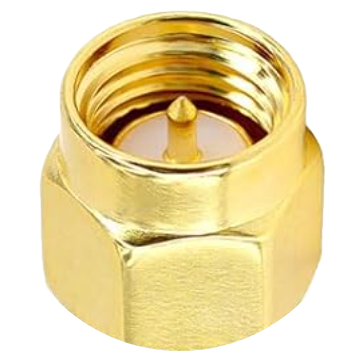
| Antenna connector | SMA male | ||
| USB connector | USB-C | ||
| DC input connector | None | ||
| DC input voltage | None | ||
| Audio connector | K1 (Kenwood) | ||
| PTT | Single side button | ||
| Buttons | Two programmable buttons on the left side, one programmable button on the top | ||
| Knobs | One power/volume knob | ||
| MicroSD | None | ||
| Built in | |||
Flashlight | |||
Analog Performance
The H9 is a better than average analog FM radio for this price class. It’s has a single, simple receive circuit, typical of similarly priced radios. The Dual Watch feature can’t receive two signals at a time, but it can hop between Band A and Band B quickly and then stay on one that has a signal present. It transmits at close to it’s claimed 10 watts, has 200 memories, and supports all the other common FM capabilities (CTCSS, DCS, etc). It’s good at AM airband reception. The modulation levels on weather receive are a bit low, but still readable. But these are not the reasons to buy this radio
Digital Features
The potential of this radio is all the digital features at this low price point: Bluetooth, GNSS, and APRS. Yes the radio supports all of these features. But the implementation is either bare bones or unworkable. Let’s take each of the key areas in turn.
GNSS
It’s called GNSS in the top level menu, but GPS in the second level menu. They mean different things. The Global Positioning System (GPS) is the constellation of satellites put aloft by the United States. GPS is one of several Global Navigation Satellite Systems (GNSS), others include Galileo, BeiDou, and GLONASS. The H9 doesn’t tell you which satellites it has a fix from, so there is no way to tell if it’s got a fix from non GPS satellites. This feature works, and the H9 can get location, date, and time from the satellites. The GNSS section of the menu has options to show you these values, but that’s it. There are no navigation features, and no logging of location data points. Settings are limited to units of measure and time zone. It’s a basic, but functional implementation of satellite location.
USB-C
Unlike most radios in this price category, the H9 has a USB-C port on the radio body, not just on the battery. This port will not draw power to operate the radio or charge an attached battery, it’s only used for programming. You can also program the radio using the Kenwood K1 connector and an appropriate cable. Again, a minimal, but workable implementation.
Bluetooth
The H9 supports bluetooth programming using the ODMaster app. It works just like TIDRADIO says it does (see below). They are using a custom BLE GATT implementation, which is fine, but it means that it’s highly unlikely you’ll ever be able to use CHIRP over bluetooth with this radio.
APRS
The headline feature for this radio is APRS support, which is unusual at this price point. The is the Ailunce HA2 and the Baofeng 5RH Pro GPS are the other radios in this price category with APRS capabilities. Because the H9 only has a single receive circuit, in order for APRS receiving to work well, you need to:
- disable squelch so the beginning of AX.25 frames doesn’t get lost (Menu 1)
- disable power save (Menu 8) so it doesn’t shut off the receiver and miss part of a frame
- disable dual watch (Menu 10) so the H9 doesn’t miss part of a frame as it hops between Band A and Band B
Let’s look at how this radio implements the three core APRS features.
Beaconing your location via APRS in a useful way requires GNSS support, which this radio has. You can configure manual beaconing via the PTT button, or via a timer. There is no Smart Beaconing support, which sends beacons more quickly when you change direction or velocity.
Then decide which band you are going to use, I use Band A, and set Menu, APRS, Advanced Set, APRS RX CH and APRX TX CH to Band A.
- Tune Band A to your APRS frequency, in the US it’s 144.390 MHz
- Turn on the GPS
- Turn on APRS
- Decide how you are going to send beacons (PTT or timer or both)
- Menu, APRS, Advanced Set, PTT Priority to APRS
If you don’t care about receiving APRS packets, you can probably skip the first 3 settings
Tom Salzer couldn’t get PTT and timed beacons to work concurrently. It worked for me on firmware 1.0.32, hardware 1.0.2, and APRS firmware 1.0.15, and APRS hardware 1.0.0
You can make the radio transmit a fixed location, but it doesn’t send object messages, so it’s not very useful.
If all you are going to do is beacon your location, this handheld works reasonably well.
Viewing other stations
Gotta turn the volume all the way down or you will be listening to APRS static
Here’s where the radio starts to fall down. The list of received stations puts new stations at the bottom, not the top, and it doesn’t show the time the message was received on the list.
You can configure whether the received APRS stations take over the display: settings, APRS, Advanced Set, RX Auto Popup. If you don’t turn this on, there is no other indicator that you’ve received a message. If you do turn it on, it works like an interrupt, not an overlay. If you are navigating the menu to another setting, and an APRS message comes in when you dismiss the Auto Popup, you are back at the home screen.
There is a Station list: Settings, APRS, Beacon List. But, you can’t attach the beacon list to the programmable buttons on the side of the radio, so you have to navigate through the menus every time (it’s 8 button presses to look at the last message you received). The beacon list is in chronological order, so the oldest beacons are shown first. The best radios show newest packets on the top, not the bottom. The beacon list shows a number and letter in parenthesis after the station name, which I figured out shows the number of bytes in the message. I wish it showed the time the message was received.
If you have selected a packet from the beacon list and are looking at it, and a new packet comes in, it jumps to the new packet with no warning.
!! It looks like the radio has no internal clock, if you don’t have a GPS fix, the time isn’t shown. Well, actually, even with a fix, the time is often not decoded in the packet. The APRS decoder is less good, it struggles with many packet times, and only shows the time on the message occasionally.
Sending and receiving messages Message sending and receiving is even worse than viewing the station list. At least the messages are grouped in their own area, some inexpensive APRS radios put beacons, bulletins, telemetry, and messages all in the same list.
It’s bad at acking messages, you can’t reply to a message you receive, and the message list doesn’t show the date and time the message was received. But hey, you can save a draft of a message (why?)
The radio has a digipeater
Allegedly. I tried a bunch of settings to see if I could get it to work, but I could never make it happen. Which is fine, I have no idea why you would want or need to run a digipeater on a handheld.
There is no user accessible KISS TNC, via USB or Bluetooth.
User Manual
The user manual:
- includes all the menu options, but lacks a detailed explanation of what they are used for and how they work
- includes illustrations and descriptions of the physical parts of the radio, including what’s shown on the display (which is often missing on radios in this price range)
- clear instructions showing how to use the ODMaster mobile app to program the radio
- does not include anything that describes all the settings you need to configure in order to get the radio to beacon APRS packets (there are a bunch)
Programming Software
Unfortunately, as of Jun 2026, CHIRP does not support this radio. Thankfully, there are several ways to change the settings and program memories. You can do all of it from the keypad, which is great in a pinch, but can be tedious. There are three options for using software to program the radio:
- the iOS or Andriod ODMaster app
- via the web at https://web.odmaster.net
- the windows based programming software downloadable from TIDRADIO
You can program this radio over bluetooth using the ODMaster app. I used the iOS version of the app for my testing. The app really wants you to create an account and log in. You can program the radio without doing so, but I chose to create one so the app would stop nagging me.
The radio uses Bluetooth Low Energy GATT to talk to your phone. GATT is the same mechanism that a heart rate monitor or other very low power device can use to talk to your phone. The practical impact for the H9 is that you should not pair the radio to your phone in the bluetooth settings of your phone. Here’s the procedure:
- Install the ODMaster app on your phone, then launch the app
- Press the BT button on the radio to turn on Bluetooth
Everything else happens in the ODMaster app:
- Tap the program icon at the bottom of ODMaster
- Press the big Connect Bluetooth button
- Select your H9 device
- Press the Read button to load the current radio settings, you should see a progress bar in the app and on the screen of the radio
- Make the changes you want to the channels (memories) and other settings on the phone
- Press the Write button to send your changes to the radio. You’ll see the progress bars again
The web version connects to the handheld using Bluetooth, and shares user credentials with the iOS (and I assume Android) apps.
The ODMaster app does have a list of repeaters, and it sorts them by the ones that are closest to you. Other than that, I couldn’t find any way to import a list of repeaters or frequences, like from a spreadsheet or CSV file.
Firmware Upgrade
TIDRADIO continues to improve the firmware for this radio, so it’s worth making sure you have the current version installed. There are two separate firmwares applicable to the H9, one for the radio, and one for APRS. To see which versions are currently installed:
- press Menu
- select Radio Info
- select Radio Info again to see the radio firmware version
- or select APRS Info to see the APRS firmware version
There are two ways to upgrade the firmware. You can use a Windows computer and a USB-C cable:
- Download the appropriate firmware from tidradio.com
- Connect the radio to your computer with the USB-C cable
- Turn on the radio
- Press and hold the 8 key on the radio to put it into firmware upgrade mode
- Use the Windows app included in the download to update the firmware
You are also supposed to be able to do it from the web at https://web.odmaster.net. When using this method, the web app says it won’t work over USB-C, you have to use a K1 to USB programming cable. I couldn’t make the firmware upgrade work from the web with either type of cable. I also didn’t see any way to upgrade the APRS firmware from the web.
How To Unlock
TIDRADIO offers three versions of this radio on their website: Unlocked, Ham, and GMRS. I bought the Unlocked version.
My guess is that all three versions are exactly the same hardware, just configured differently in software. Here’s how to switch between configurations:
- Turn off the handheld
- Hold the PTT button and the asterisk key while turning on the radio
- You’ll see a select screen, from which you can choose to lock the radio to the ham bands, GMRS band, or select Normal to allow transmission on any frequency the hardware in the radio supports. Normal in the firmware corresponds to Unlocked on the website
If you set the radio to GMRS mode it does the following:
- limits transmissions to the GMRS frequencies
- sets memory channels 1-22 to the frequencies for those GMRS channels
- sets memory channels 23-30 to the GMRS repeater frequencies
- sets memory channels 189-195 to the NOAA weather frequencies
- sets memory channels 196-199 to Marine VHF channels 21B, 83B, 23B, and 28B, which are used in Canada for the Continuous Marine Broadcast service
If you want to transmit on the 1.25m ham band, you need to also set Menu 40 to On.
Charging
You charge the battery either through its own USB-C port or by dropping it into the included cradle. It’s noteworthy that when connected directly to the battery, it draws twice the current than it does connected to the cradle. If you want to charge quickly, skip the cradle.
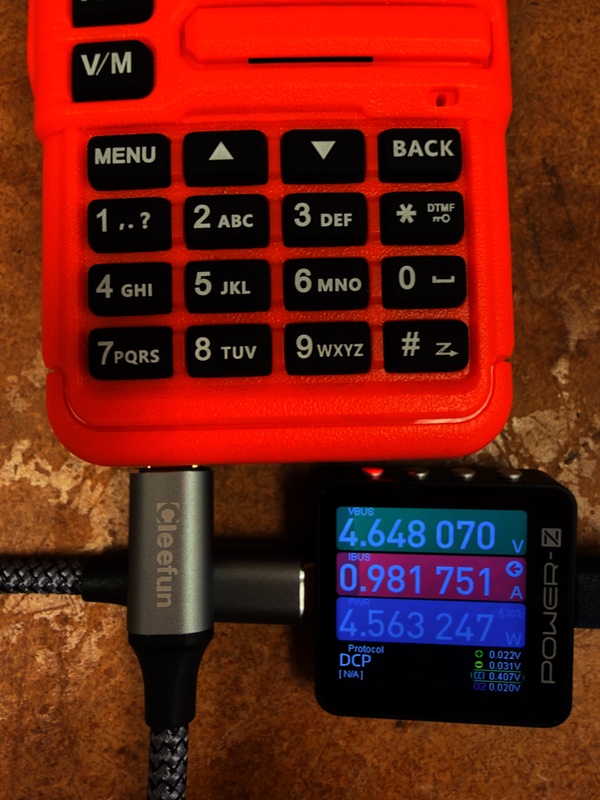
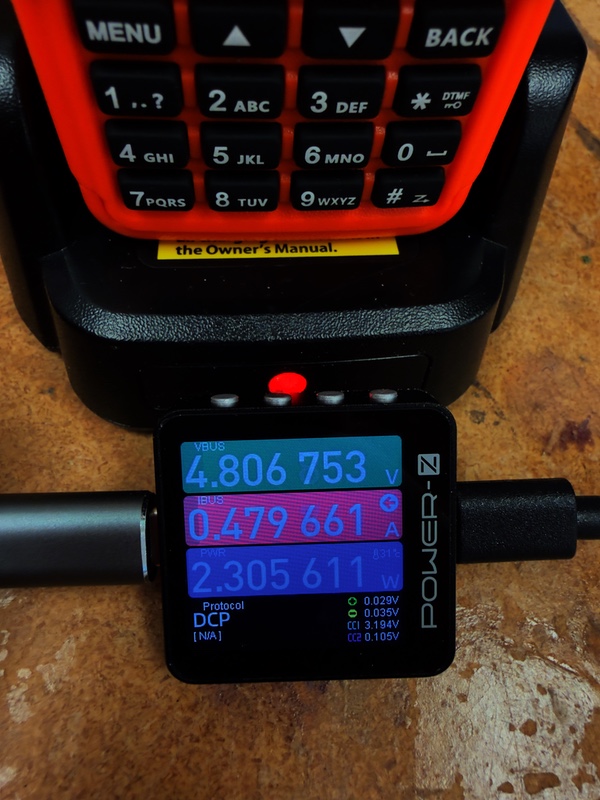
The USB-C port on the radio body is for data only. It does not draw power and can’t recharge the battery attached to the radio. Connect power to the USB-C port on the battery.
NOTES
Press and hold 7 to see spectrum analyzer, press menu for spectrum analyzer options Use arrow keys in spectrum analyzer to move a selector left and right
APRS Notes
It supposedly will do a bluetooth TNC, and it seems like it should work in the ODMaster app. But I couldn’t get that to work, and I couldn’t get a bluetooth connection with my iphone either.
On a scale of 1 to 10 for bluetooth, it gets 1.
If you have APRS on, when you receive an APRS message, the display is taken over with the display of that message. Like on many radios, there are multiple pages that display different pieces of information from the message, like speed distance and altitude, the symbol, the routing path, and the comment.
But, the implementation of these pages is terrible.
And when you exit viewing the APRS message, if you were anywhere in the radio menus or navigation, your place is lots when you dismiss the APRS message display.
If you put the beacon on timing mode and set the “number” to 60, it sends a beacon.
- 20:49:46
- 20:53:13
- 20:54:15
- 20:55:17
- 20:56:22
- PTT 20:57:05
- 20:57:26 *
I could configure both a timing beacon and a PTT beacon, but you have to set the PTT priority from call to APRS
MAYBE…When displaying a beacon, speed is in m/s, distance is in km, and altitude is in ft. No way to change it.
The date and time of the beacon are shown on the second page after selecting it, but the date/time is in GMT aka Zulu time. Sometimes, it doesn’t parse the time out of a packet, I’ve even see it miss parsing the time on a packet that it sent that got digipeated back. And I’ve seen it miss on mic-e and regular position reports
When you are looking at a beacon/message, you can’t move between messages, you have to exit, go back to the list. Sometimes, I can’t tell why, instead of going to back to the position you were previously at in the beacon list, it goes to the top, ie oldest message in the beacon list.
I could mostly get aprs messaging to work, the H9 calls it SMS, which everyone else thinks is text messages. It appears they have their own proprietary RF message sending system, but there is a setting to have it use APRS. It mostly works.
Text entry is OK, it’s hard to get into because you just have to start typing before you get the real text entry screen. the zero key is your friend, swaps between lower, upper, and numbers. the star key is the backspace
No speed unit for miles per hour. Distance has miles, altitude has feet.
Additional Resources
- Buy online directly from TIDRADIO or search for it on Amazon.com. You can get it in black, clear, orange, or green (Zhang!).
- Tom Salzer KJ7T wrote an excellent guide to getting APRS working on this radio, including the necessary settings, and some limitations.
- Jimmy KI5PRK tested the power output and spurious emissions. His measurements show output close to the claimed 10W and a mostly clean radio with a spur on the 6th harmonic.
- Transmission1UK has created a comprehensive video walk through of the radio, showing all the menu options, but only 2 minutes of the 53 minute video is about APRS.