K1 USB Programming Cable
Programming a handheld radio requires a digital interface between your computer and the handheld. In an ideal world, all radios would have a USB-C port that worked for both charging and programming and/or they would support serial over Bluetooth. Then we could use whatever connection method was convenient, and use either CHIRP or the manufacturer provided programming software. Back in reality where we live, most handhelds do not support programming over a USB-C cable. A few support programming over bluetooth, but it's often a proprietary protocol.
Many radios, particularly the less expensive ones, have a Kenwood K1 style audio connector which doubles as the programming interface. This connector has two tip-ring-sleeve (TRS) jacks, of different sizes, with standardized spacing between them. To use this connector as the programming interface, you need a specialized cable which has the K1 connector on one end, and a USB port on the other end. When connected, the cable causes a USB serial port to appear on your computer. You configure the computer programming software for your radio to use this serial port.
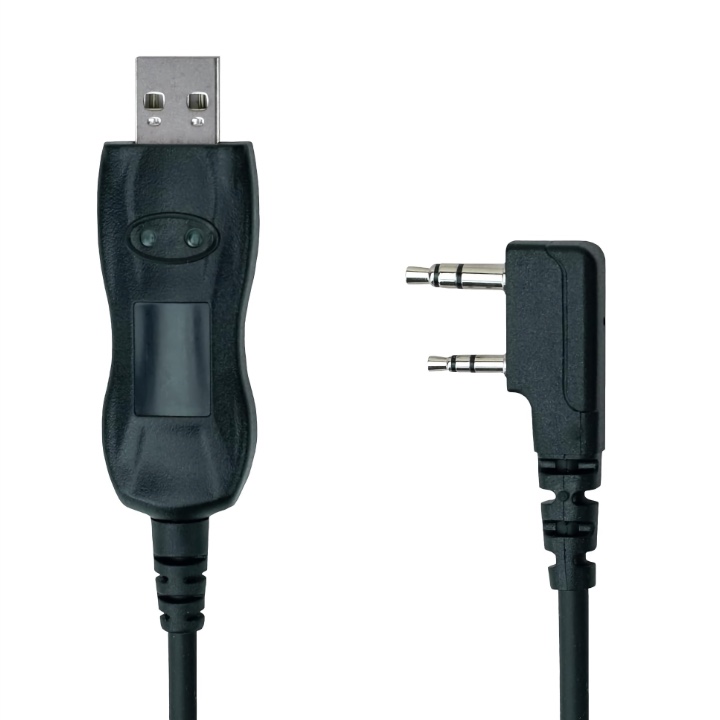
These cables have a built-in chip, powered by the USB port, which converts the audio signal from the handheld into a digital signal your computer can understand. Many manufacturers produce these K1 to USB cables. The chip chosen by the manufacturer makes a big difference in the cost, compatibility, and ease of use of the cable.
The best chip used in these cables is made by FTDI. FTDI chips are reliable, perform well, and high quality drivers for the chip are included in all modern desktop operating systems (macOS, Windows, and Linux). Programming cables utilizing genuine FTDI chips are relatively expensive, typically between $20 and $25. Unfortunately, there are many fake FTDI chips out there, some which work fine, some of which don't. To make it worse, it's nearly impossible to distinguish the fakes from the real ones when buying a cable online.
You can buy cables using other chips (Prolific is another common manufacturer) for as little as $7. These cables work, but with limitations. Typically you'll need to install a driver, and often the driver included in the box with the cable is horribly out of date. It's often not clear where to download the correct driver from. Some chip manufacturers don't provide drivers for macOS. The drivers are often old, and bugs are plentiful.
If you use Windows, you'll probably be able to make a cheap non-FTDI cable work, but it may take some fiddling. Miklor has documented the proper drivers to be used by the various chipsets, complete with download links.
If you use macOS or Linux, your radio manufacturer probably doesn't provide programming software for those operating systems. You'll end up using CHIRP, which runs on all major operating systems, and supports many different radios. For macOS, you'll need a cable with the FTDI chip and the drivers are already included in the operating system. For Linux, any cable with the FTDI chip works out of the box. Other chips may or may not have Linux drivers. If they do, great. If not, then you are out of luck and will have to buy a different cable. You may not know if a non-FTDI cable will work until you buy it and try it, it's often difficult to get accurate information about exactly which chip is in the cable before you buy it.
Recommendations
For a hassle-free experience on every operating system, get a cable with the FTDI serial chip. There are several great options available.
-
If you are planning on using digital modes, you can get a 2 for 1 by purchasing a Digirig Mobile. This device connects the audio port on your radio to the USB port on your computer, and has two chips, one for audio processing and one for a USB serial port. The Digirig uses the Silicon Labs CP2102 chip for USB serial communications. Like the FTDI chips, this chip is very reliable and widely supported by all operating systems without installing any drivers. Digirig sells a K1 cable set with a green cable and a black cable.
Digirig configuration
In order for the Digirig Mobile to program a radio using their green K1 cable, it must be in logic levels or TX-500 configuration. That means you either need to purchase it in that configuration, or disassemble it and solder the pads on the board in the proper configuration. Don't be scared by the solder part. If you have a soldering iron, solder, flux, and a multi-meter, this is an easy project. Digirig has a page with all the details, including a video.
-
The MIRKIT 6 in 1 programming cable uses the FTDI serial chip. It has swappable audio port connectors for a wide range of radios, including the K1 connector. It also has audio port connectors for Motorola, ICOM, and YAESU audio connectors. If you have a bunch of radios, this cable could save you a lot of money.
-
If you just need a K1 cable with FTDI chip, get the PC03 from BTECH. I've used it on Windows, macOS, and Linux, and haven't had to install or configure any drivers. It works flawlessly with every handheld I've tried it with.
Get some USB adapters
Most of these cables have USB-A connectors. My laptop only has USB-C connectors. I purchased some inexpensive USB-C to USB-A adapters and keep them on my programming cables so they will work with any USB port on any computer.