How to Build a Portable APRS Command Center
What is a Portable APRS Command Center
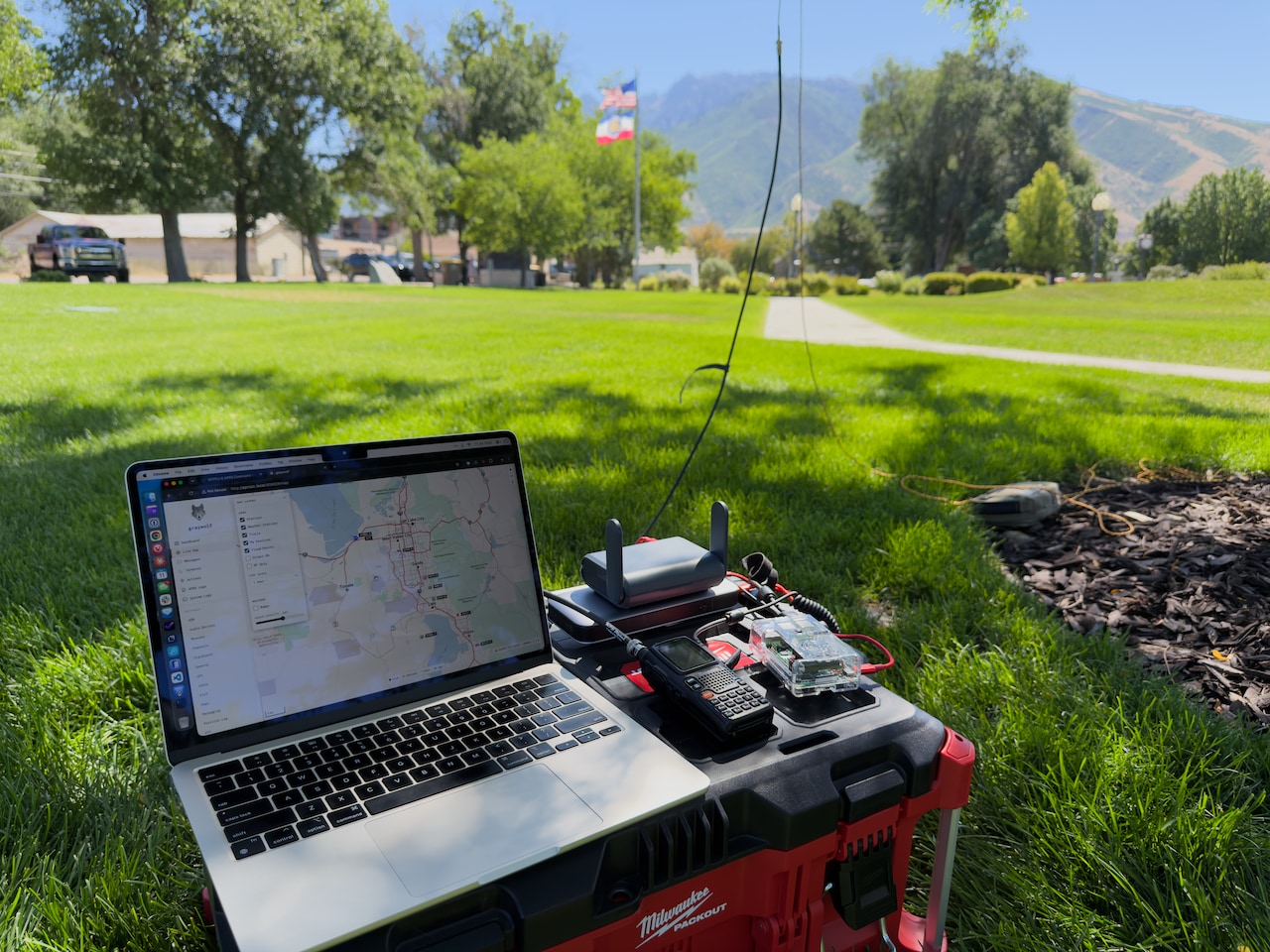
I find APRS both fun to play around with and very useful. APRS stations can be found with a wide range of capabilities and purposes. Some APRS stations are trackers: a low-power transmitter paired with a GPS that periodically beacon their position. Some APRS stations are designed for two-way messaging. I have built an APRS station that I call an APRS command center. This command center is the most capable, flexible APRS station I can create.
Because I’m a nerd, it’s fun to think about how to do all this, but I also have a practical need. I want to be able to provide APRS support for a bike race in the Utah West Desert where there is no internet, no cell service, and we need to track support vehicles over a 100 mile course. In addition to this use case, I want an APRS station that can support a wide variety of other situations. Here’s the design objectives for my portable APRS command center:
Capabilities
- Receive APRS messages, beacons, telemetry, weather reports
- Use GNSS to be aware of its location and the current time
- Beacon the current location via APRS
- Send APRS messages
- Be an APRS digipeater to extend APRS RF coverage
- Send to and receive from the APRS-IS network service if internet connectivity is available
- Provide a map with live display of APRS traffic
- Provide KISS TNC, location, time, and internet connectivity to other devices
- Allow multiple concurrent users and devices
Flexibility
- Powered from any common source: utility, solar, generator, or any 12V DC supply
- Work with several types of radios, from a handheld to a 50W mobile with a mast and high-gain antenna
- Be functional with or without internet connectivity
- Work with a variety of internet connectivity options: phone hotspot, WiFi, or ethernet
- Small and light enough to put in a backpack and run from a park bench
- Powerful enough to run an event like a marathon, parade, or bike race
- Portable enough to run from inside a moving vehicle
- Easy and quick to setup and reconfigure to meet the operating requirements of any situation
To meet all these objectives, I needed to put together a modular system, so I can tailor the station to the resources available and the requirements of the situation.
Core Hardware Components
To meet these design objectives, I need a modular system. I selected a Raspberry Pi to function as the core of the command center. A Pi is inexpensive, has a wide range of available software, is small and light, and it doesn’t consume much power. I’m using a Pi 4 with 8GB of memory. This use case doesn’t require the higher performance or power consumptions of a Pi 5. It comfortably runs on an original Raspberry Pi Model B from 2012 (I’ve tried it), but I wanted to have modern hardware and some headroom for additional software. With a portable USB keyboard and mouse, and a small monitor, you can use the Pi directly. Or you can just bring a laptop or tablet and treat the Pi like a server. I usually use the Pi like a server.
I got an inexpensive USB GPS receiver from Amazon. There are hundreds of these out there. My primary requirement was to have the receiver on a cable so it can be positioned in a different place from where you put the Pi. I got a VK-162 from Amazon, which has a magnetic mount on the receiver/antenna, is waterproof, and has a USB cable to connect it to the Pi. When indoors, you can just set it on the table and it works great. When in a vehicle, you can stick it on the roof. Mine contains a u-blox 7 chip, which has broad software support and works out of the box on Linux.
Network and Internet
In this context, network means a local TCP/IP network. Internet means that local network is connected to the public internet.
A local network is great if you have more than one operator in the station. This allows multiple people to use the capabilities of the command center at the same time. It also lets a single operator use multiple devices: one can show a real time map while another is sending and receiving messages.
You need internet access for the command center to be an APRS igate. But everything else, including live map display, can be done without it. With clever use of software, you can use bluetooth to connect to the Raspberry Pi and get a lot of functionality on a tablet or phone without having a TCP/IP network.
For utmost flexibility and portability, it would be ideal to have the same raspberry pi that runs the software of the command center also be a network switch, a WiFi access point, and an internet router. If you are a Linux expert, you can make this work on a Raspberry Pi.
I opted for something simpler and easier to make work in a variety of configurations. There are inexpensive devices called travel routers which are designed for this purpose. A travel router has its own WiFi SSID which you connect your devices to, creating a local TCP/IP network. It can also connect to the internet using a variety of methods: hotspot from your cell phone, any internet connect WiFi, or a hardwired ethernet port. When connected to the internet, it also becomes a router, making the internet connection available to all the devices on the local network.
I chose the GL.INET Slate AX for this setup. It’s small, light, and powered by USB-C. It offers WiFi 6 for a local network, with separate SSIDs for 2.4 GHz and 5 GHz bands. It also includes three hardwired ethernet ports, one designated for internet connectivity, the other two hooked to the local network. It has a USB port, which can be used for network storage (not interesting for the APRS Command Center), or to tether to your cell phone via a cable (very interesting for this use case).
The router runs OpenWrt, giving you all the benefits of community maintained software. The hardware is purpose built. I haven’t seen any generic single board computers with three gigabit ethernet ports and built-in WiFi that cost $120.
Radios and Antennas
To achieve the flexibility and modularity of our design requirements, the command center should work with a variety of radios and antennas. I’ve run the command center with:
- a $20 Baofeng GT-5R with a SignalStick antenna
- a Wouxun KG-UV9PX with double the transmit power of the GT-5R and a superheterodyne receiver, connected to an Ed Fong roll-up J-Pole hoisted up a tree
- A Kenwood TH-D75 with the built-in TNC connected to a mag mount Comet CA-2x4SR antenna on the roof of my truck
- A Yaesu FTM-500DR that’s mounted in my truck and wired to a Comet SBB5 that’s mounted on the left front fender
- A 50W Kenwood TM-V71 connected to a Diamond X300 antenna with 6.5 db of gain mounted on a 25 foot portable mast
You’ll need an audio interface to get audio from the radio to the Raspberry Pi. There are many popular options available, including the SignaLink USB and the NA6D AIOC aka the All-in-one-cable. I selected a Digirig Mobile because it uses high quality chips for audio processing and cables are readily available for most radios, including all the radios that I have. Critically, it’s one of the few such devices that has a separate tty for PTT, which in my experience makes it more reliable. Instead of a Digirig, I can use the TNC built into my TH-D75, and you could use other popular hardware TNCs like the Mobilinkd.
Optional Hardware
With a Raspberry Pi, a GNSS receiver, a radio and antenna, and the travel router, you have a very capable station. Here’s some additional components you can add for even more capability:
- Plug a small 5 port ethernet switch into the travel router for more hardwired ethernet connectivity
- A network KVM like the GL.INET Comet Pro or a JetKVM connects to the Raspberry Pi and allows you to access its login screen and desktop from any browser, including a tablet.
- If you are feeling flush, a Starlink Mini will get you connected to the internet from anywhere. It plugs right into the travel router.
Power
I could write an entire series of articles on how to build a power setup that works with solar, utility power, a gas generator, and provides both AC and DC power distribution. Maybe I’ll do that someday. If you pick devices (which I have) that can run from USB-C or directly from 12V DC, you can easily make them work with any power source.
Here’s two power options that are short and easy to explain. When utility power is available, an inexpensive 6 foot extension cord with a couple female plugs on one end is indispensible. Add an Anker Prime 200W 6 Port Desktop charger which has 4 USB-C ports and 2 USB-A ports and you can run the whole command center including endless power for your handheld radio if you have the right kit.
I frequently run the command center from a ZMI PowerPack No. 20 25,000mAh USB-C battery pack. Unfortunately this outstanding battery bank is no longer available. It can output 210W, has 2 USB-C ports 1 USB-A port, and a special USB-A to USB-C cable which allows the USB-A port to deliver higher power to USB-C devices. It can charge from one port while simultaneously sending power to the other two ports. For activations that finish up by lunchtime, the smaller Anker Nano 45W 10,000mAh battery works great.
Software
Once you have the hardware, you need software to get anything done. I installed Raspberry Pi OS on the Raspberry Pi.
Dire Wolf has been around for a long time and is highly regarded, but I decided to use the newer Graywolf. Graywolf has a web configuration UI. It shows a real-time display of received APRS position reports on a map, and has no-fuss built-in map downloads for offline map display. It can beacon any number of APRS objects at locations you define. This is very useful at events, because the command center can beacon APRS positions for start/finish, aid stations, water stops, etc. It also sends and receives APRS text messages via it’s web interface. Graywolf can be configured to publish a TCP KISS TNC on the network, allowing any other mobile/tablet/laptop to use the radio configured in Graywolf for whatever they need.
I set up gpsd on the Pi, and made it available on the network, so any device can get access to the time and position data.
chrony acts as a time server, which because we have a local GPS, can publish mostly accurate time to devices on the network.
I wrote my own kiss-tnc-bridge, which makes the TCP KISS TNC from graywolf available via Bluetooth Low Energy. Works great as a TNC for the aprs.fi app running on my cell phone.
Finally, I created my own dashboard which monitors all the devices and manages the software running on the Pi. The dashboard includes documentation on how everything works, and how to configure things for different scenarios.
Packaging and Storage
Portability was one of our key criteria, and we have a modular system, so we should package the various modules individually. There are a million kinds of pouches available that would work for this task.
I chose to use pencil cases because they are inexpensive and the right size. Here’s how I pack it all up:
- one single zip case for the Digirig and the various cables for my radios
- one double zip case for the Raspberry Pi, gps, and associated cables
- one smaller single zip case for the travel router
- one larger case for the KVM, its got a lot of associated cables
For power, I have several pouches, which you can grab some or all of, depending on what the scenario is:
- a single zip case for a USB-C battery, which is the most portable power option
- a single zip case holding the USB-C power station that runs from utility power
- a double zip case holds an extension cord and a USB-C charger
When packaging things up, I generally put the cables for a module in with the module. The travel router module has a USB-C cable for power, and some ethernet cables. The Raspberry Pi has a mini-HDMI to fullsize HDMI cable, because the Pi is the only thing I own with a mini-HDMI port.
Use Cases and Utility
Here’s some ways you can use this command center in the field:
- APRSDroid using command center WIFI and TNC
- APRS.fi for iOS using the command center bluetooth TNC
- RadioMessenger iOS app connected to KISS TCP TNC from graywolf. APRS OTA web app installed to homescreen on iPad. Both apps visible using iPadOS windowing.
- Two tablets or a laptop and a tablet, both connected to graywolf, so you and send and receive messages and view the live map at the same time
Beware
There are a number of radios that can send GPS out to the USB serial port created by a Digirig Mobile. This might seem attractive to use, because it means one less piece of kit, no USB GPS receiver. I recommend avoiding this approach. The Linux kernel, gpsd, and graywolf all have different ideas about how to use that serial port, and it’s difficult to make them play nice together reliably.
Linux’s generic serial core forces both RTS and DTR high the instant any
program opens a serial tty (inside uart_startup()), and since gpsd has no PTT
awareness, it never clears that back down the way Graywolf explicitly does right
after its own open. That’s why gpsd keys the radio and holds it, while
Graywolf doesn’t. But there’s a second, independent problem layered on top: gpsd
also calls TIOCEXCL when it opens a device, an exclusive-lock ioctl that makes
any subsequent open() from another process fail with EBUSY, whereas Graywolf
deliberately does not take this lock (per its own changelog, specifically so
shared-line PTT keeps working). That asymmetry means order of opening isn’t
just a timing nicety, it’s a hard requirement: Graywolf has to open
/dev/ttyUSB0 first and establish its connection before gpsd ever touches the
device. If gpsd gets there first and sets its exclusive lock, Graywolf’s later
open attempt fails outright and can’t get PTT access at all, a completely
separate failure mode from the RTS-keying problem. So you’re stacked with two
independent fragilities that both have to be managed correctly at all times: the
kernel’s RTS-on-open behavior (which only Graywolf, not gpsd, defends against)
and a strict “Graywolf must win the race to open first” ordering dependency
(created by gpsd’s exclusive lock and Graywolf’s lack of one). Even a
perfectly working setup today is one systemd ordering change, gpsd restart
timing shift, or reboot-sequence variation away from silently breaking again,
which is the real argument for not sharing the tty between the two roles at all.